Record the result.
Enter the pitch and depth achieved at the rod end. Keep the actual reading in the record, instead of treating the planned target as the achieved result.
A good plan is only half the battle. Dynamic Steer helps take the guesswork out of the next rod: enter the pitch and depth you actually achieved, and dynamic pitch correction recalculates the route ahead within feasible geometry and bend limits.
Offline-first field recording · public launch coming soon
Actual reading.
Updated correction.
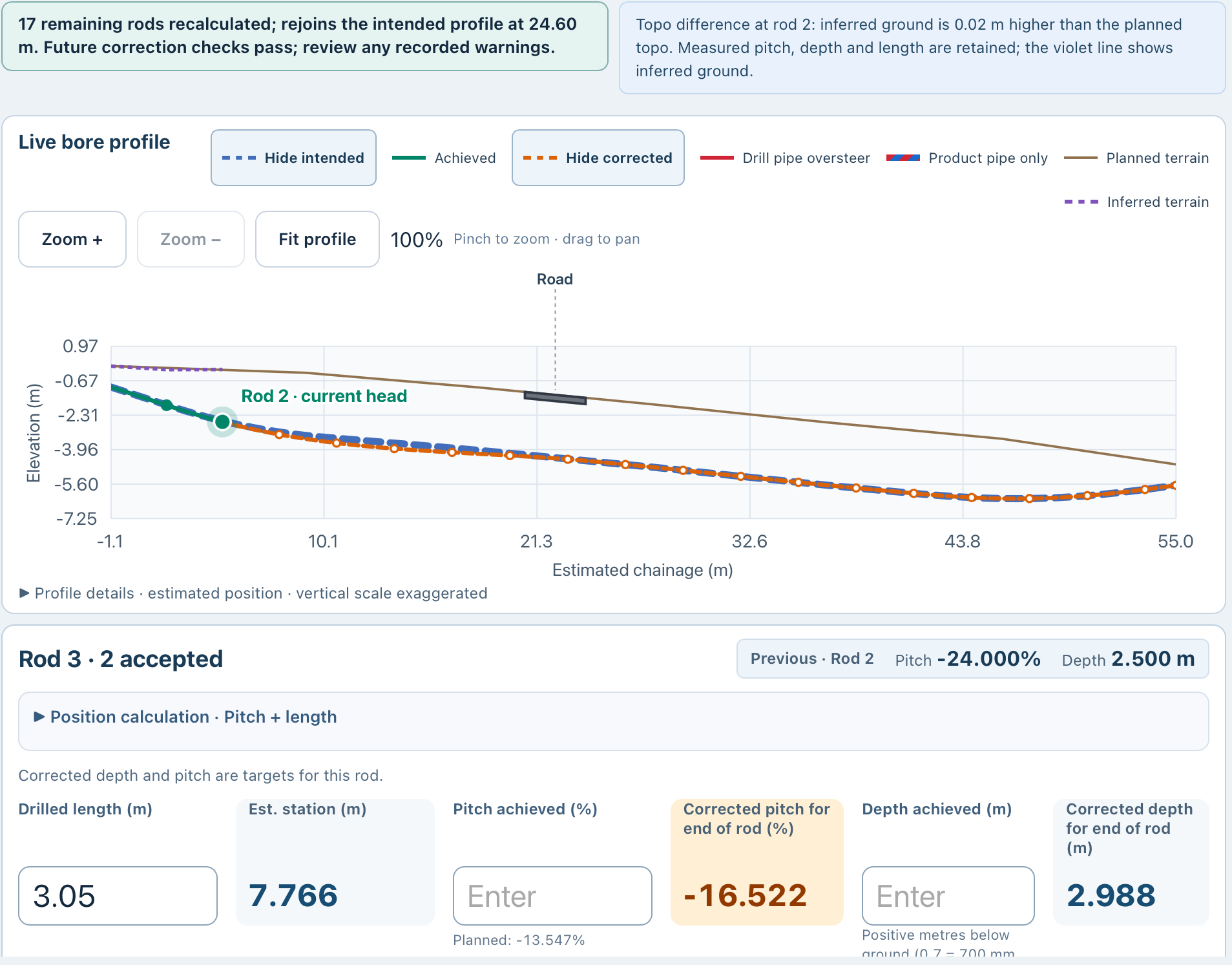
The original plan is the reference. The actual readings tell Dynamic Steer where the bore has got to. In this example, the next rod’s pitch and depth targets are recalculated after the earlier rods didn’t follow the intended shot.
Actual readings in. A revised next target out.
Give the driller the correction for the bore as recorded, with feasibility and steering limits still part of the review.
Real test-job example, not a steering recommendation. Pitch values and corrected depth are visible in the screenshot. Original planned depth of 2.8 m was supplied by the app’s creator and is outside this crop. Depth values are metres below ground.
A good plan is only half the battle.
The shot doesn’t always land exactly on the planned pitch. Enter the actual reading at the end of the rod and Dynamic Steer recalculates the correction for the route ahead. Give the driller a revised target to work with, instead of guessing the next move.
See dynamic pitch correction ↗The planned pitch and depth give the rod its starting reference.
Enter actual pitch and depth at the rod end—even when they differ from the plan.
Dynamic pitch recalculates the remaining correction, subject to feasible geometry and bend limits.
The iPad profile keeps the intended, achieved and corrected routes in view. Review the recalculation status and crossing context as you work through the bore.
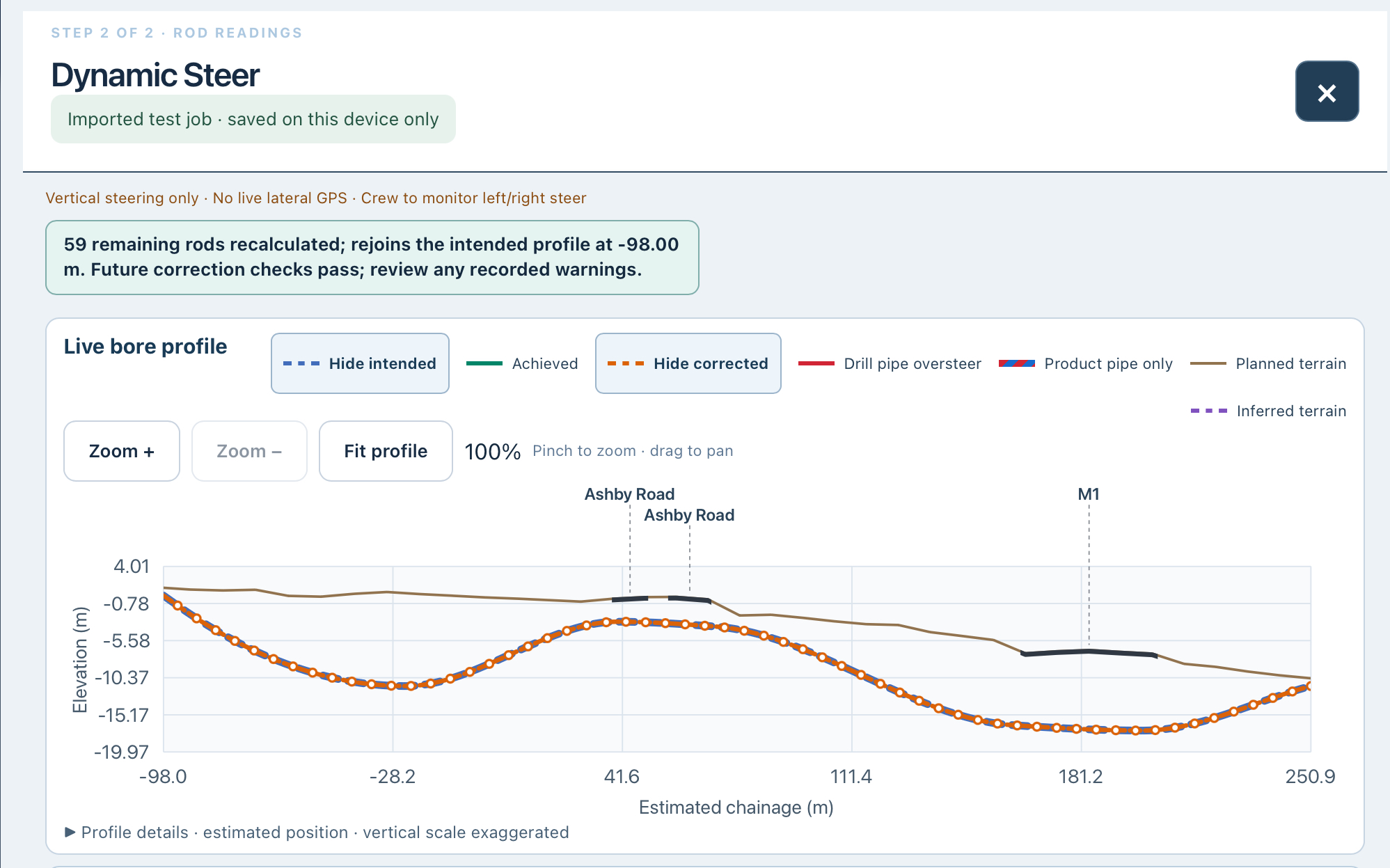
This example shows vertical pitch guidance in a local test job. It does not provide live lateral GPS; the crew remains responsible for left/right steering. Estimated position, vertically exaggerated display and the stated correction checks must be reviewed in context.
When the actual pitch differs from the planned target, the original schedule alone cannot tell the whole story. Dynamic pitch correction works from the readings the crew records.
Enter the pitch and depth achieved at the rod end. Keep the actual reading in the record, instead of treating the planned target as the achieved result.
Dynamic Steer recalculates the remaining correction from the updated bore position, giving the driller a revised target for the next part of the shot.
Review the target alongside the feasible route and bend limits. Avoid chasing the original line with an unchecked steering change.
The aim is to work back toward the intended route without asking for an infeasible correction. Recovery depends on the deviation, remaining route, available geometry and relevant drill/product limits. Dynamic Steer provides guidance for the crew; it does not automatically steer the rig.
Keep the plan and the accepted readings together, so the developing bore has a useful record.
Transfer your bore file into Dynamic Steer on iPhone or iPad. Review the planned route and rod targets before recording progress.
Enter the pitch and depth readings. Report left/right offsets where required and keep accepted readings as the job progresses.
Compare recorded progress with the plan and review the remaining correction. Dynamic pitch correction works within feasible geometry and bend limits.
Pause and resume, complete the bore or add another rod. Carry the field record back into the planned-versus-recorded reporting workflow.
Keep readings on the device and save your place in the job. Prepare required maps and topo before leaving signal coverage.
In the connected private pilot, pending readings queue for upload after reconnection, and the office can follow accepted rods against the design. Public cloud availability has not been announced.
Dynamic Steer supports crew decisions; it does not automatically control the drill rig. Lateral positions use crew-reported offsets. Confirm feasible corrections and the relevant equipment and product limits.
Depth and pitch readings make more sense alongside the plan. Distinguishing planned, recorded and corrected values helps the people reviewing the finished job understand what was intended and what was recorded.
Live job chat connects the field crew with the planning team in the private pilot. Published plan revisions return to the connected field app and recalculate the guidance. Read-only browser sharing for principal contractors, asset owners and other third parties is also in connected private testing. Viewers see the published plan and accepted rods, without job editing or team chat. Separate depth-deviation and oversteer indicators remain in development.
See accepted field readings build the bore against the published plan. Talk through the job in live chat between HDD Studio planners and Dynamic Steer users in the field.
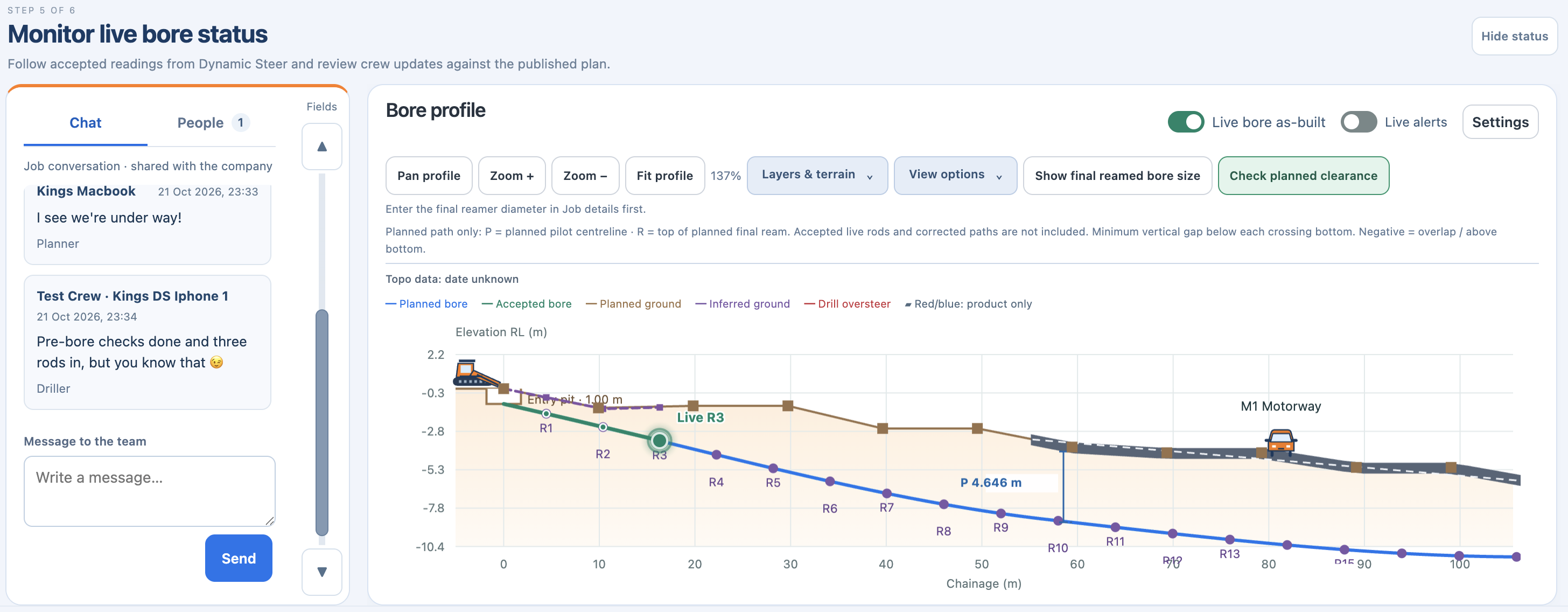
Accepted rods build the recorded bore alongside the design. The office follows the crew’s recorded progress in the same job.
Keep the job conversation with the job. The field crew can raise an issue with the planning team while everyone has the bore in view.
The planner can adjust the route or add the missing site detail, then publish the revision. When connected, the field app receives the updated plan and recalculates the bore guidance automatically.
One shared company job library. Job chat. Published plan revisions. Accepted-rod monitoring.
Connected workflow in private testing; public availability has not been announced. Live updates require connectivity and depend on crew-entered, accepted readings. Offline readings queue for reconnection. Recalculated guidance remains subject to feasible geometry and bend limits; the crew must review changes before acting.Record the actual pitch and depth achieved. Dynamic Steer recalculates the correction for the remaining route, so the next target reflects the recorded bore rather than assuming every previous rod matched the plan. Review the revised target and relevant limits before continuing.
No. Dynamic Steer presents information for the crew to review. It does not control the rig or guarantee a corrective route. Corrections remain subject to feasible geometry, site conditions and bend limits.
No. Bore files can be transferred for local use. Dynamic Steer is designed for offline-first field recording, with save and resume. Connected company jobs and live updates are being privately tested.
Yes. HDD Studio can import supported as-built exports from Subsite, DCI (Digital Control Inc.) and Underground Magnetics (UMAG) for the reporting workflow. Confirm your file format and version; supported imports do not mean a live hardware connection.
Register for launch information and choose whether to receive news of subscription discounts.
Register your interest ↗Talk to HDD Studio →